
FTP, or File Transfer Protocol, is one of the oldest internet protocols, created in 1971 to move files between computers, and it still runs on millions of servers today for tasks like uploading large website files. However, FTP is dangerously insecure because it transmits all data, including usernames and passwords, in plaintext, allowing anyone on the network path to intercept and read sensitive information. For secure alternatives, use SFTP (SSH File Transfer Protocol) or FTPS (FTP over SSL/TLS), which encrypt both login credentials and transferred files to protect against eavesdropping and attacks. Understanding FTP’s risks and when to replace it with encrypted options is essential for anyone in networking or cybersecurity.
Think of FTP like a courier service with two drivers. One driver, the control channel, handles all the paperwork, telling the courier company what to pick up and where to deliver it. A second driver, the data channel, actually loads and transports the packages. They work as a team: one talks, the other carries.
How FTP works, two channels explained
Port 21:Control Channel (Always open)
Stays open for the entire session. Carries all commands and responses — login credentials, directory listings, file names, and transfer instructions. Everything here is plaintext in standard FTP.
Port 20: Data channel(Per transfer)
Opens only when a file transfer or directory listing is needed, then closes. In active mode, the server initiates this connection. In passive mode, the client initiates it, solving firewall compatibility issues.
Active vs passive mode simplified: In active mode, the server calls back to the client to open the data channel — which is often blocked by client firewalls. In passive mode, the client opens both connections to the server — much more firewall-friendly and the default in modern FTP clients. Most web hosting FTP today uses passive mode.
FTP, FTPS, and SFTP, which one should you use?
Port 21 / 20 – FTP(None — plaintext)
Authentication: Username + password (cleartext)
Use case: Legacy only — avoid for sensitive data
Port 990 / 989FTPS (TLS/SSL encryption)
Authentication: Username + password over TLS + certificates
Use case: Secure FTP over TLS — still dual-channel
SFTP is not FTP with SSL — it is a completely different protocol that runs over SSH. Despite the similar name, SFTP (SSH File Transfer Protocol) shares no code or architecture with FTP. It uses a single encrypted channel on port 22, requires no second data port, and is significantly simpler to firewall. When you have a choice, always choose SFTP over FTP or FTPS.
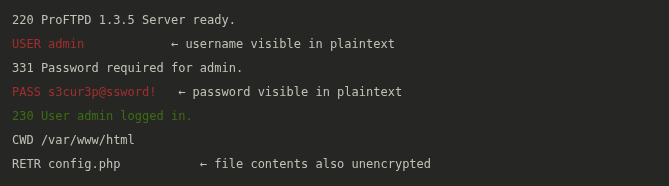
Wireshark, FTP credentials captured in plaintext
FTP security risks and how ethical hackers exploit it
Credential Sniffing (Attack)
Because FTP transmits usernames and passwords in plaintext, any attacker with access to the network path can capture them with Wireshark or tcpdump. A single packet capture on the same network segment yields working credentials instantly.
Anonymous FTP access(Attack)
Many FTP servers are misconfigured to allow anonymous login — no credentials required. Attackers use ftp target with username anonymous and any email as password to access public and sometimes sensitive files without authentication.
Brute-force login (Attack)
FTP has no built-in brute-force protection. Tools like hydra -l admin -P wordlist.txt ftp://target can systematically test thousands of passwords against an FTP server until a valid credential is found.
FTP bounce attack (Attack)
A legacy technique exploiting active mode FTP — an attacker tricks an FTP server into connecting to a third-party host, using the FTP server as a proxy for port scanning or bypassing firewall restrictions. Largely mitigated in modern servers.
During penetration testing, Nmap checks for FTP automatically. Running nmap -sV -p 21 –script ftp-anon,ftp-brute target simultaneously detects anonymous access and attempts common credential brute-forcing. Finding an open FTP port with anonymous access or weak credentials is always a high-severity finding — especially if the FTP root maps to a web server directory.
FTP hardening checklist: Disable anonymous FTP access. Migrate to SFTP (port 22) or FTPS immediately. If FTP must remain, restrict access via IP allowlist firewall rules. Enable login attempt rate limiting. Store FTP roots outside the web root directory. Log and monitor all FTP sessions for anomalous activity.

