
DNS is the internet’s phone book translating human-readable domain names into the IP addresses computers use to communicate. It is also one of the most abused protocols in cybersecurity, making it essential knowledge for ethical hackers and security professionals alike.
Every time you type a URL into your browser, a process called DNS resolution runs invisibly in the background — converting the domain name (like google.com) into the IP address the network needs to route your request. Without DNS, every user would need to memorize numerical IP addresses for every website. The Domain Name System is the distributed, hierarchical database that makes the human-readable internet possible.
DNS operates on port 53, using UDP for fast queries and TCP for larger responses like zone transfers. It is one of the oldest protocols still in active use, and because it was designed without security in mind, it has become a primary vector for a wide range of cyberattacks.
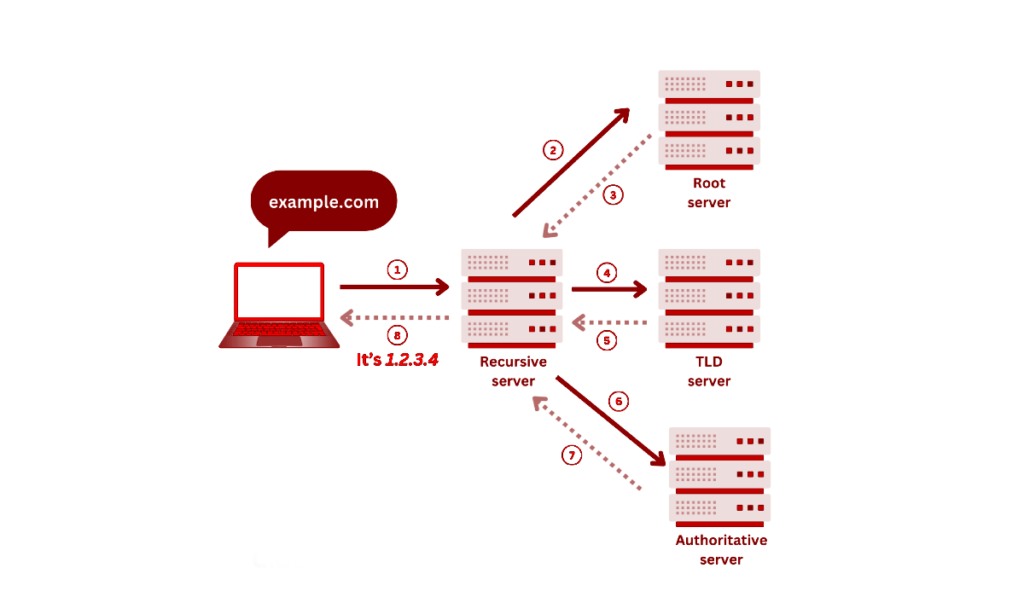
How DNS resolution works — step by step

| Local cache check Your OS checks its local DNS cache for a stored answer. If google.com was recently resolved, the cached IP is returned immediately — no network query needed. | Recursive resolver Your device queries a recursive resolver (typically provided by your ISP or a public DNS like 8.8.8.8). The resolver acts as a middleman, doing the heavy lifting on your behalf. | Root name server The resolver asks one of 13 root name server clusters. The root server does not know the IP for google.com — but it knows which TLD servers handle .com and refers the resolver there. |
| TLD name server The .com TLD server does not know the IP either — but it knows which authoritative name server is responsible for google.com and refers the resolver again. | Authoritative server Google’s authoritative DNS server holds the actual DNS records for google.com. It returns the A record — the IP address — to the resolver. This is the definitive answer. | Answer returned The resolver caches the answer for the duration of the record’s TTL (Time to Live) and returns the IP address to your device. Your browser connects. The entire process typically takes under 50ms. |
The TTL (Time to Live) value on a DNS record controls how long resolvers cache the answer before querying again. A low TTL (60 seconds) means changes propagate quickly — useful during migrations. A high TTL (86400 seconds / 24 hours) reduces DNS load but makes changes slow to propagate globally.
DNS record types — what they do
| A: Address record Maps a domain name to an IPv4 address. The most fundamental DNS record — what your browser ultimately needs to connect to a server. google.com → 142.250.80.46 | AAAA: IPv6 address record Maps a domain name to an IPv6 address — the 128-bit successor to IPv4. Increasingly common as IPv4 address space is exhausted globally. google.com → 2607:f8b0:4004::200e |
| MX: Mail exchange record Specifies which mail servers accept email for a domain, with priority values to define failover order. Critical for email delivery and phishing simulations. company.com → mail.google.com (priority 10) | CNAME: Canonical name record Creates an alias from one domain to another. Used to point subdomains to a primary domain without duplicating A records — common in CDN configurations. www.site.com → site.com |
| TXT: Text record Stores arbitrary text data — used for SPF, DKIM, and DMARC email authentication policies, domain ownership verification, and Google Search Console validation. v=spf1 include:_spf.google.com ~all | NS: Name server record Identifies which name servers are authoritative for a domain. Querying NS records during reconnaissance reveals the DNS provider and infrastructure of a target. site.com → ns1.cloudflare.com |
During passive reconnaissance, DNS records are a goldmine. Querying MX records reveals the email provider, TXT records expose SPF/DKIM configuration (indicating email security posture), and NS records identify the DNS hosting provider. All of this is public information queryable with dig company.com ANY or host -t MX company.com — zero interaction with the target required.
| Attack: DNS cache poisoning Injecting false DNS records into a resolver’s cache — redirecting users to malicious IP addresses while the domain name appears legitimate in their browser. Mitigated by DNSSEC. | Attack: DNS hijacking Modifying a victim’s DNS settings — via malware, rogue DHCP, or router compromise — to redirect all DNS queries through an attacker-controlled resolver that returns false records. |
| Attack: DNS amplification DDoS Sending small spoofed UDP DNS queries to open resolvers that respond with large answers to the victim’s IP — amplifying attack traffic by up to 70× without a botnet. | Attack: DNS zone transfer abuse A misconfigured authoritative server that allows unrestricted zone transfers hands attackers a complete map of all DNS records — a critical recon finding in penetration testing. |
| Attack: DNS tunneling Encoding data inside DNS queries and responses to exfiltrate data or establish C2 communication channels that bypass firewalls — since DNS traffic is rarely blocked or inspected. | Defense: DNSSEC DNS Security Extensions add cryptographic signatures to DNS records — allowing resolvers to verify that answers are authentic and have not been tampered with in transit. |
DNS zone transfers (dig axfr @ns1.target.com target.com) are one of the first tests in active reconnaissance. A server that allows zone transfers returns every DNS record for the domain — subdomains, internal servers, mail infrastructure, and more. Finding an unrestricted zone transfer is always a critical finding that reveals the entire DNS landscape of a target organization.

